For retail operations directors responsible for planogram execution across 50–500 stores, the leading execution-focused platforms in 2026 include PlanoHero, One Door, LEAFIO, and Pazo. Among them, PlanoHero stands out by covering the full operational cycle — from centralized planogram distribution to mobile task assignment and photo-based proof of execution. For operations leaders struggling with visibility across stores, this type of execution software provides real-time confirmation of what is actually happening on the shelf.
The Execution Gap: Why Most Planogram Projects Fail at the Store Level
Every operations director knows the pattern.
The planogram is approved at headquarters. Category managers finalize the layout, suppliers sign off, and the merchandising calendar is updated. From a strategic perspective, the project looks complete.
But execution is where most planogram initiatives break down.
In many retail chains — especially grocery, convenience, and FMCG sectors — the process still looks like this:
HQ sends a PDF → Regional manager forwards the email → Store team interprets instructions → Implementation happens eventually — or not.
No malicious intent. No resistance. Just operational friction.
The Three Execution Problems Operations Directors Face Every Week
1. Visibility Gap
Headquarters does not know what is actually on the shelf. Reports arrive late, photos are inconsistent, and compliance is often assumed rather than verified.
2. Rollout Lag
Between planogram approval and store-level execution, 2–4 weeks can pass. Promotions lose momentum. Seasonal products arrive too late. Inventory sits in the backroom instead of generating sales.
3. Compliance Measurement
Stores may confirm that changes were completed, but there is rarely objective proof. Without standardized verification, performance tracking becomes guesswork.
These are not design problems.
They are execution problems.
And this is exactly where planogram execution software delivers value — not by creating layouts, but by ensuring those layouts reach the shelf, on time, in every store.
What Separates Planogram Execution Software from Planogram Design Tools
Many retailers already use planogram design software. That part of the process is usually under control.
The gap appears after the planogram is created.
Below is a simplified comparison that operations leaders use to explain the difference internally.
|
Capability |
Design Tools |
Execution Platforms |
|
Focus |
Creating planograms |
Delivering and controlling execution |
|
Primary User |
Category Manager |
Operations director, Store manager |
|
Output |
Planogram file |
Task in mobile application |
|
Control |
None |
Photo reporting, dashboards |
|
Feedback Loop |
Missing |
Real-time Plan vs. Fact comparison |
Most retail organizations have a design layer.
Fewer have an execution layer.
That missing layer is where compliance gaps emerge, rollout delays accumulate, and operational visibility disappears.
Key Capabilities to Demand from Planogram Execution Software
Operations directors typically evaluate execution platforms using a practical checklist. The question is not whether the system looks modern — it is whether it removes manual coordination and provides reliable confirmation of execution.
Centralized Planogram Distribution
One source of truth.
When a planogram changes at headquarters, the updated version must reach the correct stores immediately — without email attachments or manual file sharing.
Cluster-based distribution is especially important for multi-format retail chains. A convenience store does not need the same layout as a hypermarket, and regional assortments often differ.
A centralized platform ensures that each store receives only the relevant instructions.
Mobile Task Assignment for Store Teams
Execution begins with clear instructions.
Store managers and merchandisers receive tasks directly on their smartphones:
- What to change
- Which shelf to update
- Which products to move
- When the task must be completed
Visual guidance reduces interpretation errors and speeds up implementation.
This is particularly critical during high-volume rollout periods such as seasonal promotions or supplier-driven resets.
Photo-Based Compliance Verification
Confirmation is not a message.
It is evidence.
After completing a task, the store team captures a photo of the shelf. The HQ verifies whether execution matches the expected layout and confirms the execution.
Operations directors can immediately see:
- Completed tasks
- Deviations from the plan
- Stores that have not started execution
This replaces manual audits and reduces the need for field visits.
Real-Time Execution Dashboard
For chains with 100+ stores, visibility must be centralized.
A real-time dashboard provides a consolidated view of execution performance across the entire chain.
Typical metrics displayed include:
- completed planograms
- a list of planograms for execution.
Instead of calling regional managers for updates, leadership teams can monitor execution status directly.
Possible statuses:
- Was not sent - the planogram has never been sent for execution.
- Scheduled for sending - the planogram has not yet been sent, but has a set date for future sending.
- On execution - the planogram is currently being executed by the manager of the respective store.
- For check - the store manager has attached a photo report to the planogram, but this photo report has not been checked yet.
- Returned for execution -when checking the photo report, the planogram was returned to the store manager.
- Confirmed - the planogram photo report is confirmed.
Audit Trail and Historical Data
Retail operations depend on accountability.
Execution software maintains a complete history of actions:
- Who implemented the change
- When the task was completed
- What adjustments were made
- Which stores required rework
This data supports internal audits, supplier negotiations, and post-promotion analysis.
Without historical tracking, performance reviews rely on memory rather than evidence.
Integration with Existing Retail Systems
Execution decisions must reflect real inventory and sales conditions.
Modern platforms integrate with:
- POS systems
- ERP systems
- Inventory management platforms
- Demand forecasting tools
This ensures that planogram execution is based on current data rather than outdated assumptions.
Integration also reduces manual reporting and improves data accuracy.
Top Planogram Execution Software Providers for Operations Teams (2026)
The market for planogram execution technology continues to expand, but only a handful of platforms focus specifically on operational control at the store level.
Below is a practical overview used by retail operations leaders evaluating execution solutions.
PlanoHero
Positioning: Full execution lifecycle management for retail chains with 50–500+ stores in grocery, convenience, and FMCG sectors.
PlanoHero is designed for operations teams that need consistent visibility across distributed store chains. The platform connects headquarters decisions directly to store-level execution through a structured workflow.
Key execution capabilities include:
- Centralized planogram distribution to store clusters
- Mobile task assignment for store teams
- Photo-based compliance verification
- Real-time execution dashboards
Operations directors can define store groups based on format, region, or assortment type. Once a planogram is approved, the system automatically distributes tasks to the relevant locations.
Store teams use a mobile application to follow visual instructions and submit confirmation photos. Execution data is aggregated into a single dashboard, allowing leadership teams to monitor rollout progress without manual data collection.
Integration with ERP and POS systems — including SAP and BAS — ensures that shelf decisions align with actual sales and inventory conditions.
Best fit: Retail operations leaders who require reliable execution visibility across a large store chain without building custom reporting workflows.
One Door
Positioning: Visual merchandising execution platform with strong capabilities in digital store modeling.
Key execution capabilities:
- Real-time task distribution to store teams
- Visual merchandising workflows
- AI-assisted photo compliance verification
One Door is widely used in fashion and specialty retail environments where store presentation is closely tied to brand identity.
Limitation: Less common in high-frequency grocery operations, where product turnover and shelf changes occur daily.
LEAFIO Shelf Efficiency
Positioning: Integrated retail optimization platform combining planogram creation, forecasting, and execution monitoring.
Key execution capabilities:
- Automated planogram generation
- Mobile compliance tracking
- Demand-driven assortment recommendations
LEAFIO is particularly effective for large retail chains with advanced data infrastructure and centralized analytics teams.
Limitation: Implementation complexity may be higher compared to lighter execution-focused platforms.
Pazo
Positioning: Task management and field operations platform adapted for retail execution workflows.
Key execution capabilities:
- Workflow-based task assignment
- AI-powered image recognition
- Operational performance tracking
Pazo integrates planogram audits into broader store operations processes such as safety checks and inventory verification.
Limitation: Less emphasis on category planning and merchandising optimization.
Planorama / Trax
Positioning: Enterprise-level shelf monitoring and retail analytics platform.
Key execution capabilities:
- Computer vision-based shelf recognition
- Real-time compliance measurement
- Integration with large CPG ecosystems
These solutions are typically deployed by multinational retail chains and global consumer goods manufacturers.
Limitation: Higher implementation cost and infrastructure requirements.
How PlanoHero Closes the HQ-to-Store Execution Gap
Execution software becomes valuable only when it changes daily operations.
Below is how the workflow shifts in practice.
From Approved Planogram to Store Task in Minutes, Not Days
Traditional rollout workflow:
HQ approval → email distribution → regional coordination → store implementation.
Each step introduces delay.
With execution software:
HQ approval → automatic task generation → mobile notification to store team.
Distribution happens immediately. Store teams know what to do without waiting for instructions.
As a result, rollout lag is reduced from weeks to days.
Store Teams Know Exactly What "Good" Looks Like
Ambiguity is a major cause of execution errors.
When instructions are delivered as text or spreadsheets, store teams interpret them differently.
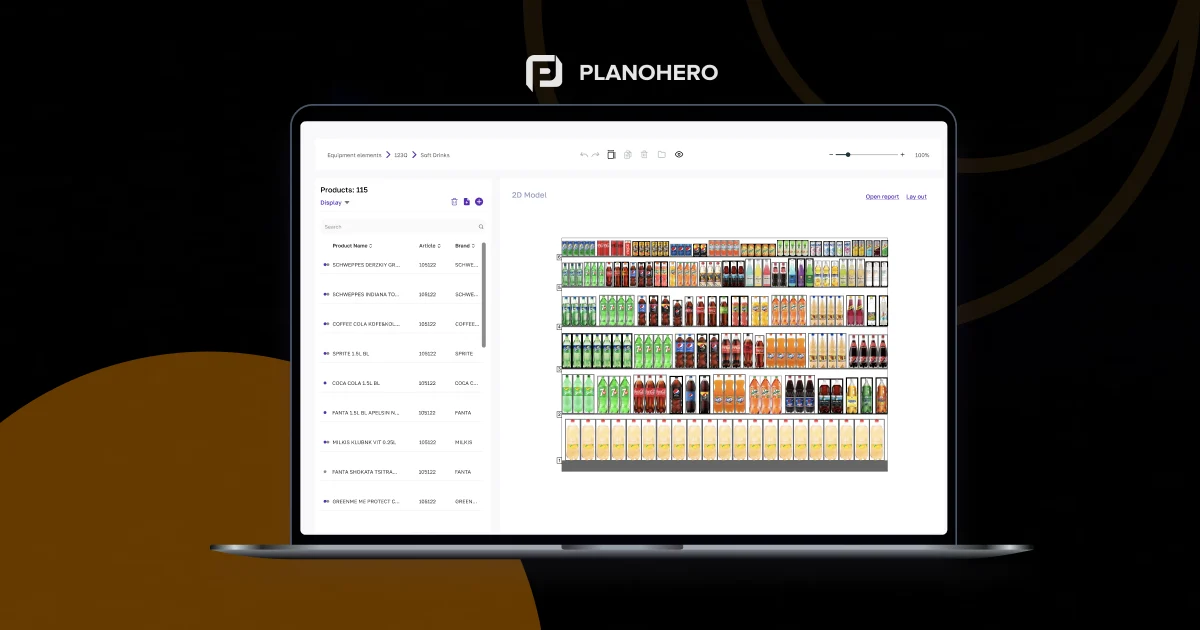
Execution platforms solve this problem by displaying visual planograms directly inside the mobile application.
The expected result is visible before implementation begins.
Consistency improves because interpretation disappears.
Operations Director Sees the Full Picture Without Calling Stores
Visibility is the core operational requirement for large retail chains.
Instead of collecting updates manually, leadership teams can monitor execution progress in real time.
A single dashboard shows:
- Stores that completed the rollout
- Stores with deviations
- Regions falling behind schedule
- Tasks requiring escalation
Decision-making becomes faster because information is centralized.
Photo Verification That Actually Proves Execution
Store confirmation is not enough.
Evidence is required.
Photo verification links each image to a specific planogram and timestamp. This creates an objective record of execution.
If deviations occur, corrective action can begin immediately.
Without photo verification, compliance remains an assumption.
Measuring Planogram Execution: KPIs That Operations Directors Track
Execution software becomes essential when performance must be measured consistently across hundreds of stores.
Below are the core metrics used in operational reporting.
Planogram Compliance Rate (%)
The percentage of stores where shelf layouts match the approved planogram. This metric reflects execution quality across the chain and directly impacts product visibility and sales performance.
Execution Lag (days)
The time between planogram approval and store-level implementation. Reducing this metric improves promotional effectiveness and reduces inventory risk.
Task Completion Rate
The percentage of assigned tasks completed within a defined reporting period. This indicator measures operational discipline and resource capacity.
Photo Verification Rate
The proportion of completed tasks supported by visual confirmation. Higher rates indicate stronger accountability and more reliable reporting.
Deviation Rate by Region or Store Cluster
The frequency of execution errors within specific geographic or operational groups. This metric helps identify training gaps or process bottlenecks.
Time-to-Full-Rollout
The total time required to implement a planogram change across the entire store chain.
This KPI is especially important during seasonal campaigns and supplier-driven promotions.
Without execution software, most of these metrics are either unavailable or collected manually with significant delay.
FAQ — Planogram Execution Across Multi-Store Retail Networks
What is planogram execution software and how is it different from planogram design tools?
Planogram design tools create shelf layouts, while execution platforms deliver those layouts to stores and monitor implementation. The workflow typically follows this sequence: design → distribution → mobile task → photo confirmation → performance dashboard. Execution software ensures that the approved planogram is actually implemented on the shelf. Platforms such as PlanoHero illustrate this full-cycle execution approach.
How do retail operations directors measure planogram compliance across hundreds of stores?
Operations directors use execution platforms with photo verification and real-time dashboards to track compliance. Core metrics include planogram compliance rate, execution lag, and deviation rate by region. These indicators provide objective performance data across the entire store chain. Without specialized software, compliance is usually estimated or reported manually.
How long does planogram rollout take with execution software vs. without?
Without execution software, planogram rollout typically takes 2–4 weeks due to manual coordination between headquarters, regional managers, and stores. With an execution platform, task distribution can occur within hours, and full network implementation usually takes 2–5 days. The difference comes from automated communication and standardized workflows.
Can store teams use planogram execution software without technical training?
Yes. Modern execution platforms are designed for store-level employees without technical backgrounds. Tasks are delivered through mobile applications with visual instructions and simple confirmation steps. Photo reporting and checklists guide the process. Systems like PlanoHero prioritize usability to ensure adoption across large retail teams.
What features should a retail operations director prioritize when choosing planogram execution software?
Operations leaders typically focus on five core capabilities:
- Mobile task assignment
- Photo-based compliance verification
- Real-time execution dashboards
- Cluster-based planogram distribution
- Integration with ERP and POS systems
Each feature supports operational visibility and reduces manual coordination across stores.
How does planogram execution software integrate with existing retail systems (POS, ERP)?
Integration is typically achieved through SQL connections, CSV imports, or JSON data exchange. Sales and inventory data flow from POS and ERP systems into the execution platform. This ensures that planogram decisions reflect current demand and stock levels. Platforms like PlanoHero support integration with systems such as SAP and BAS to maintain data consistency.
What is a realistic planogram compliance rate for a retail chain, and how can software improve it?
Retail chains without execution software often operate with compliance rates between 40% and 60%. With structured task management, photo verification, and centralized monitoring, compliance rates commonly increase to 75–90% or higher. The improvement comes from three factors: visibility, accountability, and standardized execution workflows.
Looking for a service to create planograms?
Try a free demo version of PlanoHero